> ## Documentation Index
> Fetch the complete documentation index at: https://docs.nocnoc/llms.txt
> Use this file to discover all available pages before exploring further.

# Managing orders

> How nocnoc orders appear in Shopify and how to identify them at a glance.

<p style={{ fontSize: '12px', fontWeight: '700', letterSpacing: '0.08em', textTransform: 'uppercase', color: '#6b7280', margin: '0 0 10px' }}>Order management</p>

## How will you see nocnoc orders?

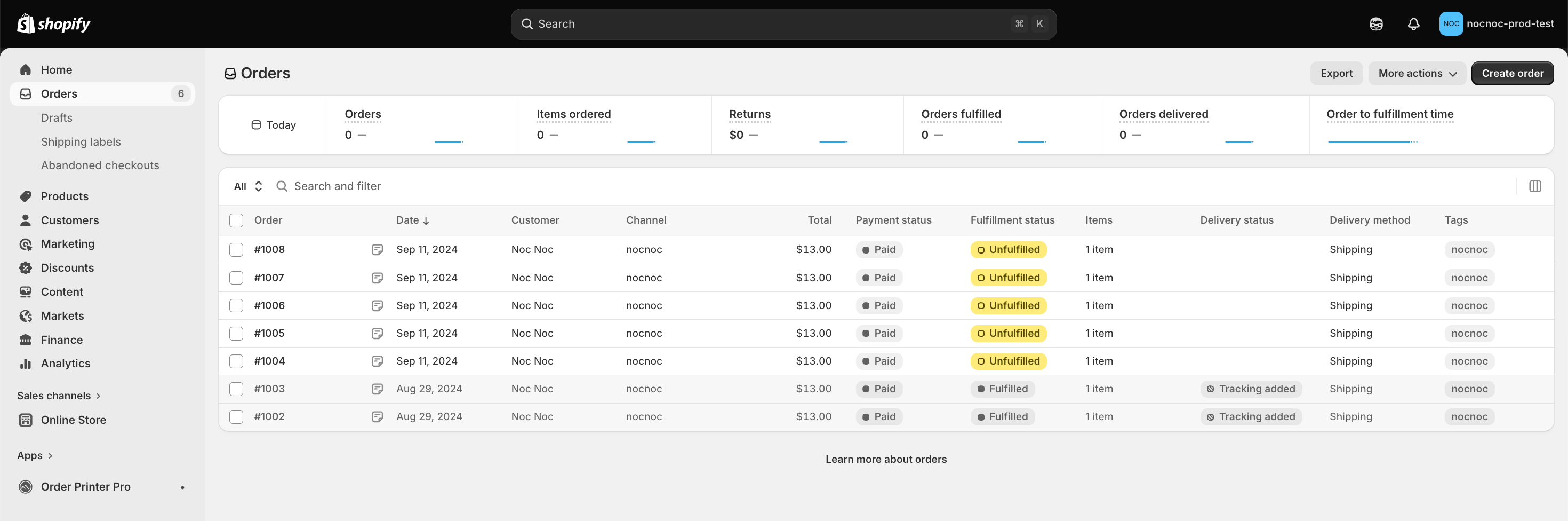
Once the integration is set up, your nocnoc orders will flow directly into Shopify alongside all your existing orders. No new dashboards, no separate tools — manage everything from the same place you always have, with no new procedures to learn.

<img src="https://mintcdn.com/nocnoc/ItNAHnC1YArUqins/shopify/images/shopify_orders.png?fit=max&auto=format&n=ItNAHnC1YArUqins&q=85&s=4d9effb8a5fc67a5255496514e272cb7" alt="Shopify Orders panel — nocnoc orders appear alongside your existing orders" style={{ borderRadius: '10px', border: '1px solid #e5e7eb', marginTop: '8px', width: '100%' }} width="2940" height="976" data-path="shopify/images/shopify_orders.png" />

***

<p style={{ fontSize: '12px', fontWeight: '700', letterSpacing: '0.08em', textTransform: 'uppercase', color: '#6b7280', margin: '32px 0 10px' }}>Identification</p>

## How to identify nocnoc orders

Every nocnoc order shares the same three identifiers, so you can always tell them apart at a glance:

<div style={{ display: 'grid', gridTemplateColumns: 'repeat(3, 1fr)', gap: '16px', marginTop: '8px' }}>
  <div style={{ border: '1px solid #e5e7eb', borderRadius: '10px', padding: '16px 20px' }}>
    <img src="https://cdn.jsdelivr.net/npm/@tabler/icons/icons/user.svg" style={{ width: '18px', height: '18px', marginBottom: '12px', pointerEvents: 'none', filter: 'brightness(0) saturate(100%) invert(27%) sepia(97%) saturate(1564%) hue-rotate(210deg)' }} alt="" />

    <p style={{ fontSize: '15px', fontWeight: '600', color: '#0f172a', margin: '0 0 6px' }}>Customer name</p>
    <p style={{ fontSize: '13px', color: '#6b7280', margin: 0, lineHeight: '1.6' }}>All nocnoc orders appear under the customer name Noc Noc in Shopify.</p>
  </div>

  <div style={{ border: '1px solid #e5e7eb', borderRadius: '10px', padding: '16px 20px' }}>
    <img src="https://cdn.jsdelivr.net/npm/@tabler/icons/icons/tag.svg" style={{ width: '18px', height: '18px', marginBottom: '12px', pointerEvents: 'none', filter: 'brightness(0) saturate(100%) invert(27%) sepia(97%) saturate(1564%) hue-rotate(210deg)' }} alt="" />

    <p style={{ fontSize: '15px', fontWeight: '600', color: '#0f172a', margin: '0 0 6px' }}>Tag</p>
    <p style={{ fontSize: '13px', color: '#6b7280', margin: 0, lineHeight: '1.6' }}>Every order is automatically tagged nocnoc, making filtering and bulk actions straightforward.</p>
  </div>

  <div style={{ border: '1px solid #e5e7eb', borderRadius: '10px', padding: '16px 20px' }}>
    <img src="https://cdn.jsdelivr.net/npm/@tabler/icons/icons/map-pin.svg" style={{ width: '18px', height: '18px', marginBottom: '12px', pointerEvents: 'none', filter: 'brightness(0) saturate(100%) invert(27%) sepia(97%) saturate(1564%) hue-rotate(210deg)' }} alt="" />

    <p style={{ fontSize: '15px', fontWeight: '600', color: '#0f172a', margin: '0 0 6px' }}>Shipping address</p>
    <p style={{ fontSize: '13px', color: '#6b7280', margin: 0, lineHeight: '1.6' }}>Orders always ship to the same nocnoc US warehouse address — no end-customer addresses to manage.</p>
  </div>
</div>

<div style={{ borderLeft: '3px solid #0061FC', paddingLeft: '16px', marginTop: '24px', background: '#f8faff', borderRadius: '0 8px 8px 0', padding: '14px 16px' }}>
  <p style={{ margin: 0, fontSize: '14px', color: '#374151', lineHeight: '1.65' }}>
    <strong>Simplified operation.</strong> nocnoc orders never include final customer addresses or contact details. You always ship to the same fixed destination, keeping your fulfillment workflow as simple and predictable as possible.
  </p>
</div>
